Top-down replay
Your phone video, straightened into a flat track map with every car cut out and tracked frame by frame.
 See what makes you faster.
Opening your Sample 5 session…
MINI-Z LAP ANALYSIS FROM A PHONE VIDEO
Film a session from above the track. ParaLLaps turns the video into a top-down replay with every car tracked, then shows your lap times, speed and grip, the corners where you lose time, and a ghost of your best lap to race.
The demo uses Sample 5: 59 seconds of three cars at RCHQ. Everything runs in your browser.
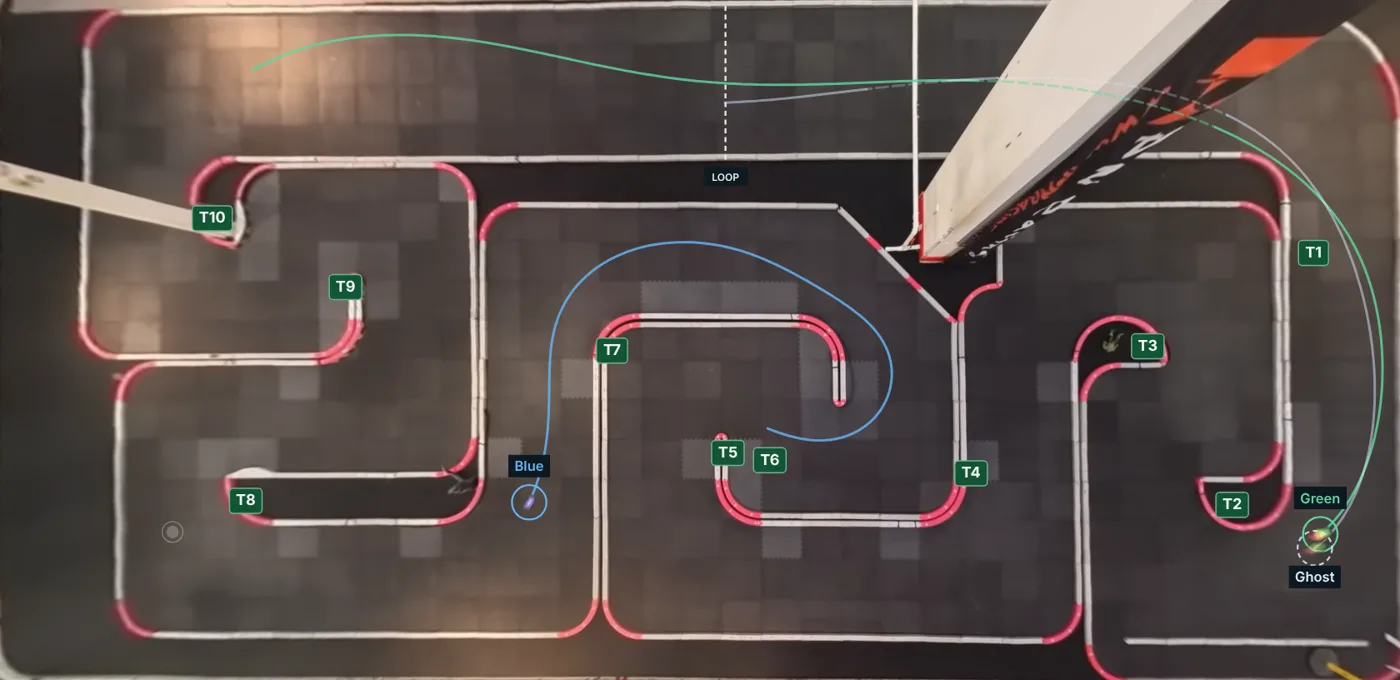
Your phone video, straightened into a flat track map with every car cut out and tracked frame by frame.
Lap times, speed and grip for every lap, plus a heat map of where you lose time and how consistent your line is.
Your best lap replays as a see-through car that restarts at the timing loop, so every lap is a race against it.
YOUR VIDEOS
Upload a track video, mark the track once, and keep a session for every car you care about.
Red joins your points; thin blue extensions show where rails meet beyond the video frame.
Pan and pinch to zoom. Choose a corner, then tap to set it.
Play or scrub to choose a clear frame.
Drag the four handles onto the track's outer corners. On a rounded corner, put the handle where the two straight outer rails would meet. The fisheye fits itself once all four are placed.
No saved setup matches this video’s dimensions yet. Use Auto-detect corners.
Reuse only when the camera position, framing and lens mode match.
Corrects itself once all four corners are placed. Use − and + or the slider to fine-tune.
Estimated during fitting. Measurement scale is confirmed in Step 2.
TOP-DOWN PREVIEW
Use location and camera to find a transform saved in this browser. A fixed camera keeps its transform across layouts; each layout has its own grid and timing loop.
Select A, B, C and D at the outer grid corners.
For unusual camera angles: place each corner by tapping, and draw guide lines along rails to judge straightness.
The grid starts at your track corners, with the tile count read from the floor’s tile shades. Check it against the seams, then nudge. This grid becomes the replay crop.
Drag anywhere in the top-down view to move the grid. Fine-tune with the buttons below; one nudge is one top-down image pixel.
Match the timing loop to the real track loop. Place two endpoints across the lane; laps are timed when the car crosses this line.
Every car on track in this time range is found automatically, including cars that leave the view and come back. Next you pick which cars’ runs to save.
This exact file matches the preserved Sample 5 recording. You can reuse its verified analysis without rerunning tracking.
Turns belong to this layout: set them once and every recording of it uses them. Each turn runs from its entry through its apex to its exit; the gaps between turns are the straights.
Pick a found car and save its run. Save as many cars as you like; they share this recording.
No complete laps for this car. Move the timing loop across its path, or recheck laps from the saved tracking.
For two stints in one video, save each as its own session. Every complete lap inside the range is kept.
Check this car’s path and name before saving.
FIND YOUR NEXT COMPARISON
Independent car runs, with their shared source recording retained.
YOUR SESSIONS
Every car run you kept from a video. Open one to replay it, find where the time goes, or race a ghost.
Sessions come from your videos: open a video, mark the track, then keep the cars you want. Classes, racer labels and notes are yours to organize them.
ROOF-MOUNTED 360 CAMERA
59.1 seconds · 3 cars · 11 complete laps
LOCATION · LAYOUT · CAMERA
Sample 5 venue · Sample 5 layoutRoof 360 · Fixed cameraFROM THE RECORDING
Each corner is timed from halfway along the straight before it to halfway along the straight after it, so the approach and the drive out count. Turns less than 1.5 m apart are one corner. Typical is your middle lap through it; fastest is your quickest. Line differences are measured toward the inside of each turn; differences smaller than the video can measure (5 cm, 0.2 m of turn-in, 0.5 km/h) are left out.
TRACK SETUP
Match the seams, count the tiles, and place the timing loop.
Confirm the grid, track bounds and timing loop once. Saved recordings reuse their confirmed setup.
SETUP FOR THIS RECORDING
The preview is saved only when you confirm the track. Personal cameras need a position check for each recording.
TWO LAPS. ONE TRACK.
Start together, or line up at any section. Each lap keeps its real pace.
Select a car in Review, then choose any two of its laps—or compare it with another car.
Keep replaying the rest of the straight and the next corner after the lap ends. Uses available following footage; synthetic laps use an estimated continuation. Official lap times stay unchanged.
AT THE SAME COURSE POSITION
CORNER BY CORNER